My favorite side-project Wakapi.dev runs on MySQL and since we have more than 4,200 registered users today (thank you all! 🙏), the database size has grown to almost 34 GB. Accordingly, restoring a database dump from backup is quite time-consuming. In fact, it used to take almost 10 hours until recently. The following is a brief rundown of how I sped this up to just barely more than 1.5 hours – just because I’m so excited by this simple change.
The naive way
The naive, old-fashioned way of dumping and restoring a MySQL database is to use the mysqldump utility in combination with the plain mysql command-line client.
1 | # dump the database |
This already includes some “performance tweaks”, like skipping foreign key checks during import, but nevertheless is super slow. Restoring the database this way ran for almost 10 hours on my computer, while CPU and SSD were pretty much idling most of the time. The reason is that the above command restores the SQL file line by line in a sequential way, that is, it runs single-threaded.
My “brilliant” idea to speed this up
I was thinking about a way to speed this up, especially to run at least parts of the import in parallel. If Postgres’ pg_restore can be so much faster, why can’t we? My idea involved two “optimizations”:
- Use batch-wise
INSERTstatements for rows of the same structure. That is, don’t insert rows of the same table one by one, use multi-valued insert queries.- Note: Later, I learned that this is probably exactly what
mysqldump‘s--extended-insertflag does
- Note: Later, I learned that this is probably exactly what
- Use multiple concurrent connections. Instead of establishing a single connection to the database, open multiple and run inserts in parallel, as long as they don’t depend upon each other.
Of course, to enable for the second option, you’d first need to identify interdependencies between tables. If table A references table B in a foreign key relation, table B would have to be loaded before A. However, in a naive implementation, you could simply “order” the tables by how they depend on each other and only parallelize within the same “hierarchy” level of that dependency tree.
For example, given the database schema of Wakapi, pretty much all relations depend on the users table, so that one would have to be created first.
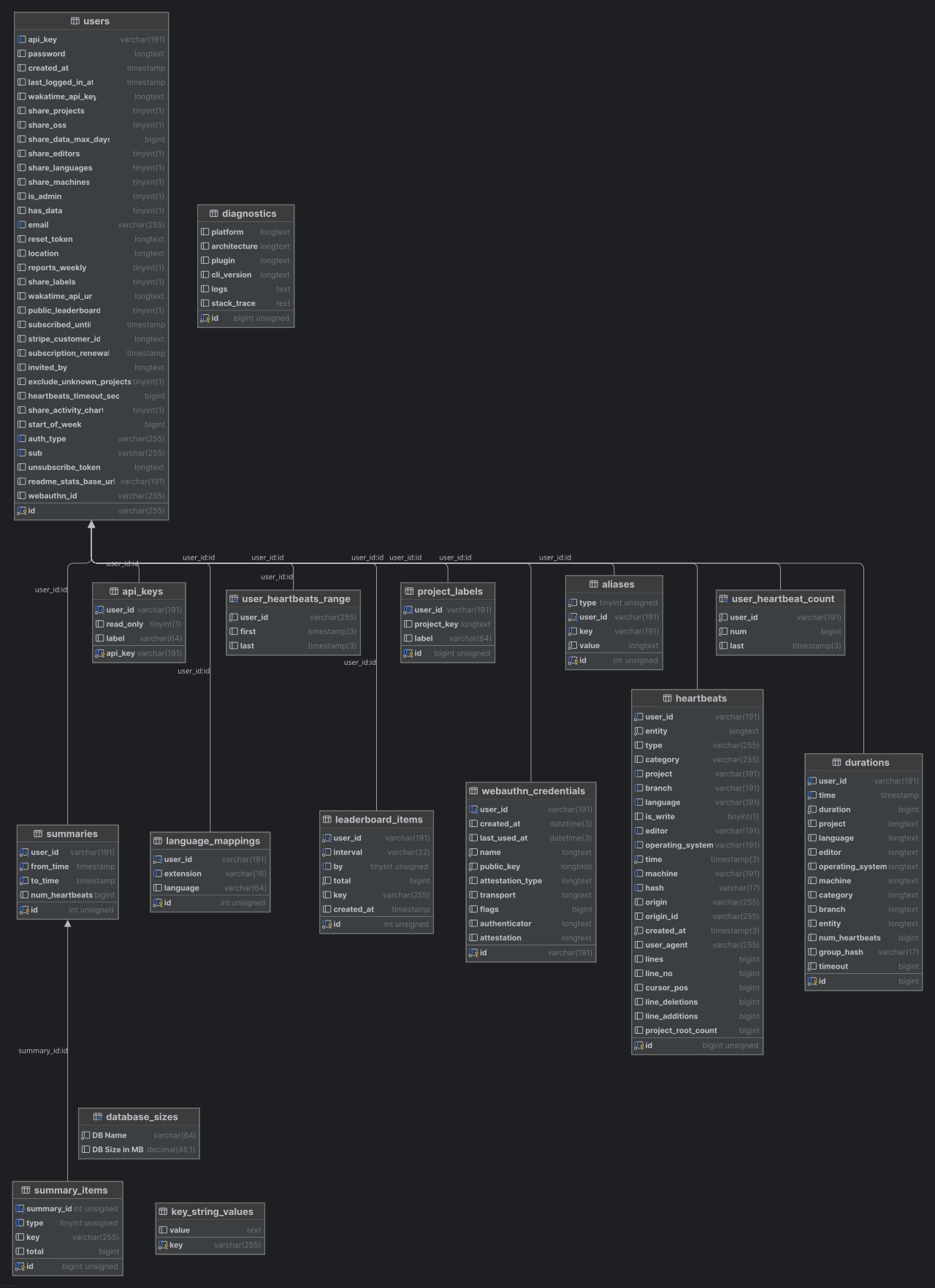
Totally committed to implementing such a “revolutionary” backup restore tool for MySQL databases, I was already researching on SQL query parsers (such as JSqlParser) that I could use to realize the above-mentioned logic.
Then I found that modern versions of MySQL (>= 8.0) already feature pretty much exactly this functionality as part of MySQL Shell.
The modern way using MySQL Shell
This article on Multithreaded Data Dumps With MySQL Shell illustrates the whole magic. The MySQL Shell is a “new” interface to MySQL in addition to the plain, old mysql CLI tool and features a bunch of new functionality that can be called via a JavaScript or Python API.
Specifically, it comes with amazing tools for dumping and restoring individual tables, entire databases or even the whole server instance:
util.dumpTables()util.dumpSchemas()util.dumpInstance()
For restoring, there’s a single util.loadDump() method.
Both dumping and restoring work in a multi-threaded fashion, utilizing pretty much the above logic (plus many more smart tweaks and tricks).
Long story short, I refactored my backup + restore pipeline to this:
1 | # dump the database (or multiple, if wanted) |
The skipBinlog parameter prevents the target MySQL server from writing binary logs for all queries (which would pointlessly “duplicate” all data already included in the dump once again) and deferTableIndexes instruct the server to not update table indexes “line by line”, but in a batch-wise fashion after the import itself had run.
The dump created by dumpSchemas() exists in form of a local directory that consists of a series of compressed data- and metadata files for every table. By default, zstd compression is used, but you can opt for gzip or none using the compression parameter.
1 | ferdinand@wakapi:~/backup/data/wakapi.dump$ ls -al |
Conclusion
Restoring Wakapi’s 34 GB large database sped up from having to run overnight to barely taking 1 1/2 hours by switching from the old, naive mysqldump approach to the more modern mysqlsh way. I’m simply amazed by this and will advocate for this technique as the go-to way for MySQL backups.

Comments